What Are the Most In-Demand Skills to Put on My Resume?
Expert guide on what Are the Most In-Demand Skills to Put on My Resume. Practical tips, templates, and examples to boost your job search and career in 2026.


What Are the Most In-Demand Skills to Put on My Resume? (And How to Showcase Them)
When employers scan your resume, they’re hunting for specific skills that match their needs—fast. So, what are the most in-demand skills to put on your resume? Whether you’re switching careers or climbing the ladder, your resume needs a mix of hard skills (technical know-how) and soft skills (people-first strengths). But trends shift quickly: remote collaboration tools today might be replaced by AI fluency tomorrow.
Getting this right isn’t luck—it’s strategy. You need to balance industry-specific expertise with universal traits like adaptability. Let’s break down which skills recruiters prioritize and how to highlight them so your resume gets noticed.
4 Must-Have Skill Types Employers Look For
- Tech Savvy: Data analysis, coding basics (Python/Excel), or CRM software.
- Soft Skills: Communication, teamwork, problem-solving.
- Adaptability: Show you thrive in change (remote work examples help).
- Certifications: Industry-specific badges like Google Analytics or PMP.
The Best Resume Templates to Highlight Your Skills
🌟 Advance Your Career
Your next career move starts with a standout resume. Build yours today!
A clean design ensures your skills shine. Try these high-quality templates:
- Modern Pro: Bold headers for technical skills + infographic-style progress bars.
- Minimalist Grid: Ideal for creative roles—prioritizes projects over bullet points.
- Chronological Classic: Showcases career growth while front-loading key abilities.
Crafting a Skills Section That Stands Out
🎯 Beat the ATS System
Our templates are specifically designed to pass Applicant Tracking Systems while looking professional.
- Tweak per job: Copy keywords from the job description into your resume.
- Quantify results: “Boosted sales by 30% using CRM tools” > “Used CRM tools.”
- Avoid fluff: Replace “team player” with “led cross-departmental project.”
Your Top Questions Answered
Do I need different resumes for different jobs?
Absolutely! Tailor your skills section to match each role’s requirements.
How many skills should I list?
Aim for 6–8 core competencies that align with the job posting.
Should soft skills even be on a resume?
Yes—prove them with brief examples like “resolved client conflicts via email.”
What if my industry is niche?📈 Career Growth Tip: Update your resume with our AI-powered builder for your next opportunity!
📈 Career Growth Tip: Update your resume with our AI-powered builder for your next opportunity!
Focus on transferable skills (e.g., research techniques for academia or data roles).
The job uses “AI”—how do I include that?
Add tools like ChatGPT/Midjourney under “Technical Skills” if relevant.
A Strong Resume Isn’t Just About What You Say—It’s How You Say It🤖 ATS Optimization Made Easy
Automatically optimize your resume for ATS with our AI-powered keyword analysis.
🤖 ATS Optimization Made Easy
Automatically optimize your resume for ATS with our AI-powered keyword analysis.
The most in-demand skills to put on your resume need a polished template and tight organization to grab attention. A cluttered layout buries your strengths. Want an edge? Explore professionally designed resume templates. Whether you’re a graphic designer or engineer, pairing sharp content with clean formatting gets you past applicant tracking systems—and into interviews.
Don’t Let Your Resume Hold You Back
Join 6+ million professionals who have created winning resumes with StylingCV
📝 Create Your Resume in 5 Minutes
✨ Take the Next Step
Professional resume = More opportunities. Start building today!
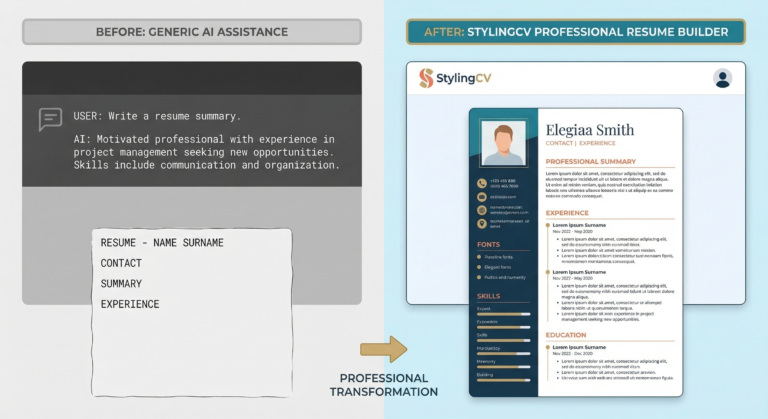
Don’t let a poorly formatted resume hold you back. Use our intelligent resume builder to create a professional resume that gets past ATS systems and impresses recruiters.
✅ Ensure ATS Compatibility
Don’t let automated systems filter you out – use an ATS-optimized template. Build ATS Resume
👉 check your resume's ATS compatibility
💡 Pro Tip: StylingCV is not just a resume builder — it’s a smart AI builder that thinks. build your resume in less than 2 minutes in less than 2 minutes.
Related Articles
- LinkedIn Profile Optimization 2026: Get Your Dream Job | StylingCV
- Salary Negotiation 2026: How to Ask for More Money | StylingCV
- In-Demand Skills 2026: Complete Guide to Job Market Success | StylingCV
Explore more articles in our Content Hub
Ready to build a professional resume? Build Your AI Resume Now
🦁 Check Your Resume with Stylion
Our AI-powered ATS resume checker analyzes your resume like a real recruiter. Get your score instantly.