
Guide SEO Premium
Modèles de CV compatibles ATS
Votre CV peut être solide et pourtant sous-performer si le format empêche les systèmes de suivi des candidatures de le lire correctement. Les modèles de CV compatibles ATS permettent à votre expérience d’être analysée avec précision, d’être mieux notée et d’être examinée plus rapidement par les recruteurs.
Cette page se concentre sur l’essentiel : ce qu’est un modèle compatible ATS, quels choix de mise en page aident ou nuisent, comment choisir le bon modèle selon votre niveau de carrière, et comment optimiser votre CV à la fois pour les logiciels et les recruteurs humains.

Pourquoi les modèles compatibles ATS sont importants
La plupart des candidatures en ligne sont filtrées avant d’être lues par un recruteur. Cela signifie que la mise en page n’est pas qu’une question de design — elle fait partie du processus de traitement de votre CV. Un modèle attrayant mais qui perturbe l’ordre de lecture peut réduire la visibilité de l’expérience que vous souhaitez mettre en avant.
Les modèles de CV compatibles ATS résolvent ce problème en donnant à votre contenu une structure compréhensible par les logiciels de recrutement. Les meilleurs utilisent des titres clairs, une mise en page conventionnelle et une présentation lisible tout en restant suffisamment soignés pour un responsable RH. Cet équilibre est essentiel.
Pour StylingCV, ce sujet est aussi un enjeu SEO à forte intention. Les personnes qui recherchent des modèles compatibles ATS ne cherchent pas de l’inspiration générale pour leur carrière. Elles ont généralement besoin d’une solution efficace immédiatement. La page doit donc répondre clairement aux questions pratiques et orienter les utilisateurs vers des modèles et un créateur qui éliminent rapidement les obstacles.
Bases de l’ATS
Qu’est-ce qu’un modèle de CV compatible ATS ?
Un modèle de CV compatible ATS est une mise en page conçue pour être lue correctement par les systèmes de suivi des candidatures. Ces systèmes scannent les CV, extraient les informations et organisent les données du candidat dans des champs comme l’expérience professionnelle, les compétences, la formation, les certifications et les coordonnées.
Si le modèle est trop complexe, le logiciel peut lire les sections dans le mauvais ordre, manquer des mots-clés ou ignorer des contenus importants. C’est pourquoi les modèles compatibles ATS privilégient la structure à la décoration. Ils sont conçus pour aider le logiciel à analyser le CV avec précision d’abord, puis pour faciliter la relecture par les recruteurs ensuite.
Cela ne signifie pas que le CV doit être fade ou dépassé. Un bon modèle compatible ATS peut rester moderne et professionnel. L’essentiel est que le design serve la lisibilité, et non l’inverse.
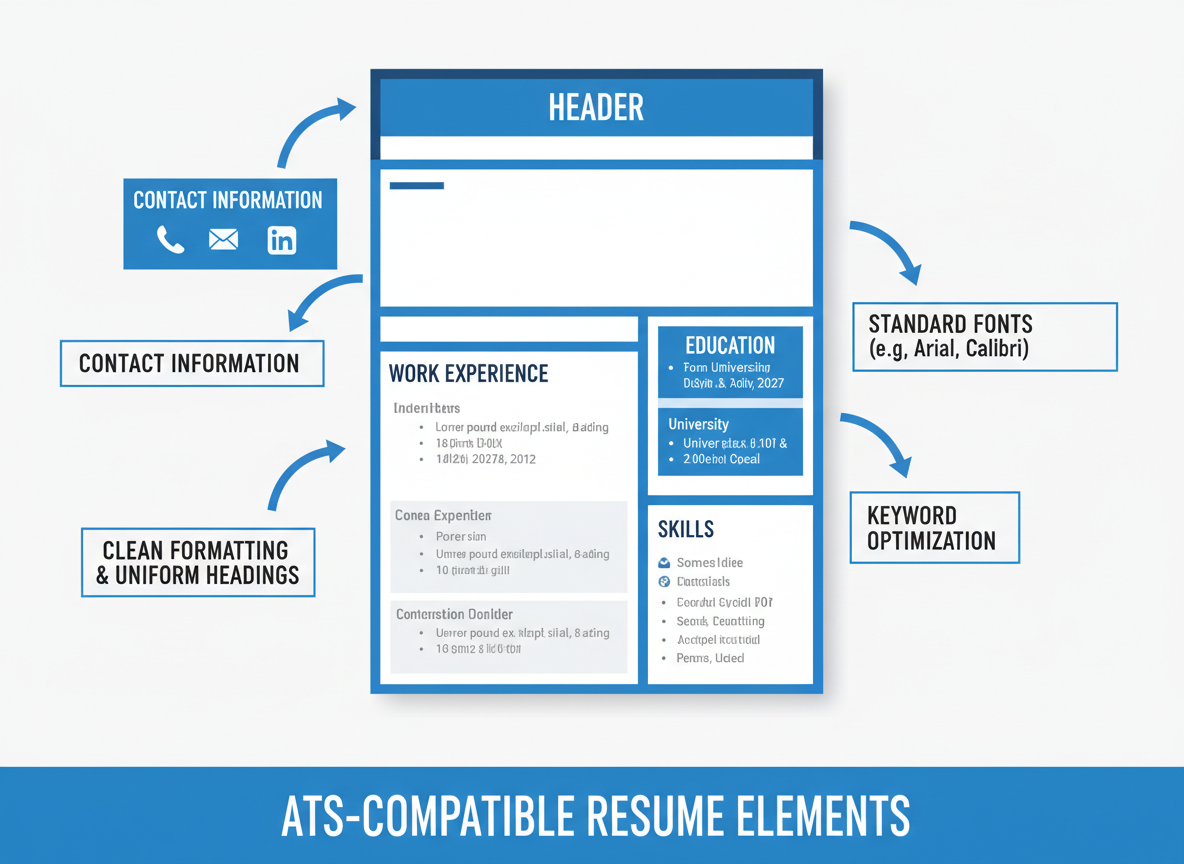
Comment les systèmes ATS lisent les CV
La plupart des outils ATS scannent un document, extraient les champs, les comparent à une offre d’emploi et classent les candidats selon leur pertinence. Le logiciel recherche les intitulés de poste, les compétences, les dates, les diplômes et les formulations qui correspondent au poste.
Votre modèle doit donc rendre ces éléments évidents. Des titres standards comme Expérience professionnelle, Formation et Compétences aident le système à placer les informations correctement. Un format de date cohérent permet d’estimer l’expérience. Une hiérarchie claire facilite à la fois l’analyse et la lecture par le recruteur.
- Les coordonnées doivent être faciles à identifier dans le corps principal du document.
- L’historique professionnel doit être structuré de façon cohérente par poste, entreprise et dates.
- Les compétences doivent être faciles à lire sans barres graphiques ou icônes à la place du texte.
- Les certifications et réalisations mesurables doivent apparaître sous forme de texte lisible classique.
Choix du modèle
Qu’est-ce qui rend un modèle compatible ATS ?
La façon la plus simple de penser la compatibilité ATS est la suivante : si un logiciel peut lire le CV dans un ordre prévisible de haut en bas, vous avez déjà une longueur d’avance. Si la mise en page dépend de graphiques, de colonnes, de zones de texte flottantes ou d’éléments de design qui perturbent ce flux, le risque augmente.
Éléments sûrs pour l’ATS
- Structure à une colonne ou très lisible
- Titres standards et noms de sections conventionnels
- Polices lisibles comme Arial, Calibri ou similaires
- Format de date cohérent
- Puces pour les réalisations
- Espacement suffisant pour une lecture claire
Éléments à risque élevé
- Zones de texte et tableaux pour le contenu principal
- Graphiques à la place du texte
- En-têtes et pieds de page contenant des informations importantes
- Icônes décoratives au lieu de libellés
- Ordre de lecture confus avec plusieurs colonnes
- Polices inhabituelles ou mises en page de type infographie
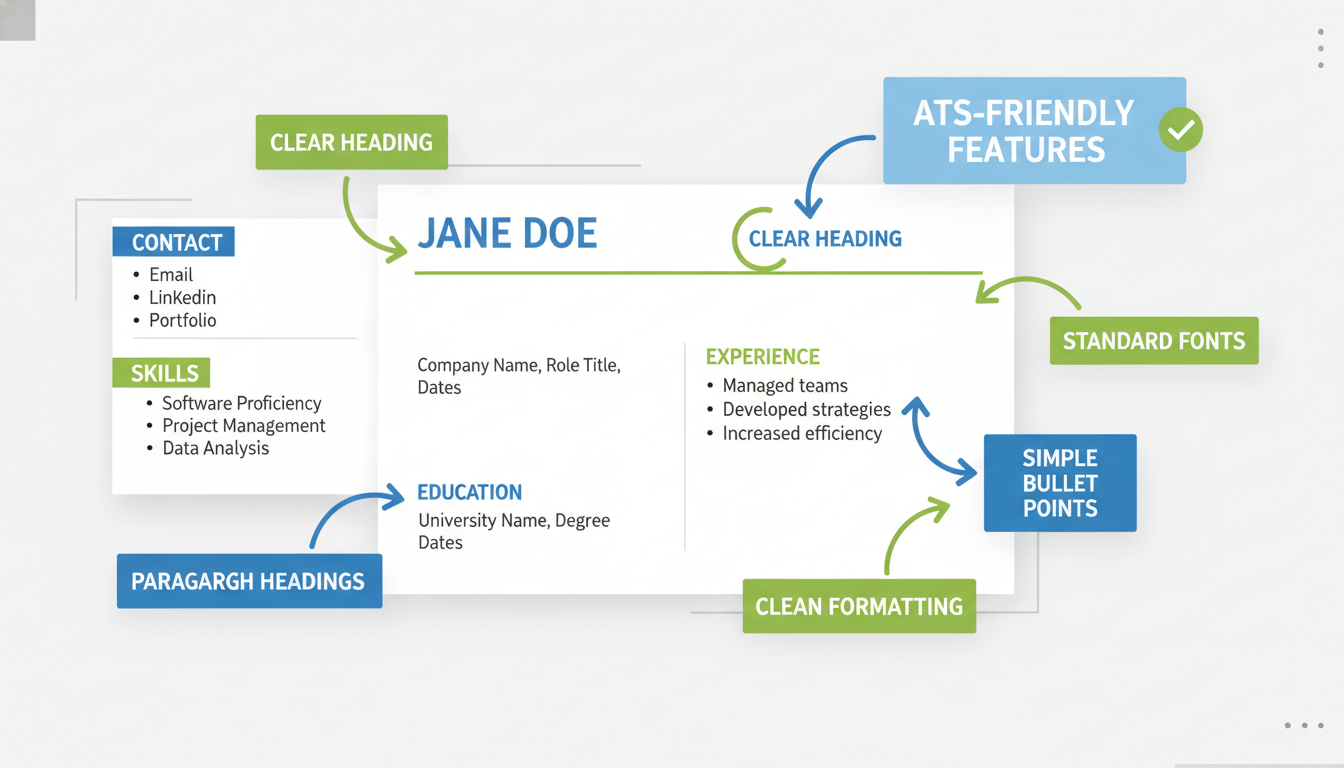
La structure la plus sûre pour la plupart des candidats est le CV chronologique ou hybride. Le chronologique fonctionne bien si votre expérience récente est pertinente et montre une progression. L’hybride est utile si vous souhaitez mettre en avant un résumé de compétences sans perdre la lisibilité ATS.
Les CV fonctionnels peuvent aider lors d’une reconversion, mais ils doivent être utilisés avec précaution. Les recruteurs font souvent plus confiance à des chronologies claires, et certains ATS fonctionnent mieux quand l’historique professionnel est évident.
Pourquoi c’est utile
Avantages d’utiliser un modèle de CV compatible ATS
Le principal avantage n’est pas esthétique. C’est la visibilité. Si vos informations sont bien catégorisées, votre CV a plus de chances d’être noté, associé et présenté à un recruteur. Cela peut augmenter le nombre de candidatures qui avancent.
Les modèles compatibles ATS font aussi gagner du temps. Au lieu de lutter contre des problèmes de mise en page, vous pouvez vous concentrer sur le contenu : des puces plus percutantes, des résumés plus clairs, une meilleure adéquation des mots-clés et des preuves plus pertinentes. Les bons modèles réduisent la friction du design et facilitent la mise à jour de votre CV pour plusieurs candidatures.
Il y a aussi un avantage d’image. Une présentation cohérente sur toutes vos candidatures vous aide à paraître professionnel. Quand un recruteur voit un CV propre et facile à lire, cette clarté fait partie de l’impression que vous laissez.

Qui en bénéficie le plus ?
- Candidats débutants : ont besoin d’une structure qui met en valeur la formation, les projets et les stages.
- Professionnels intermédiaires : ont besoin de modèles qui valorisent les réalisations et la pertinence des mots-clés.
- Cadres supérieurs : doivent mettre en avant l’impact, le périmètre et les résultats business.
- Personnes en reconversion : ont besoin de modèles qui valorisent les compétences transférables sans embrouiller la chronologie.
Bonnes pratiques
Les règles de mise en page ATS qui comptent le plus
Il existe des dizaines de conseils de mise en page en ligne, mais seuls quelques-uns font la différence. Si vous appliquez ceux-ci, votre CV sera déjà bien mieux positionné.
- Utilisez un format de fichier standard. Dans la plupart des cas,
.docxest le choix le plus sûr sauf si l’entreprise demande un PDF. - Gardez des titres de section classiques. Utilisez les noms attendus par le système : Expérience professionnelle, Formation, Compétences, Certifications.
- Utilisez un seul style de date partout. Exemple : Janvier 2022 – Présent sur tout le document.
- Placez les coordonnées dans le corps du texte. Ne les cachez pas dans l’en-tête, le pied de page ou des graphiques latéraux.
- Utilisez des puces, pas des paragraphes denses. Les réalisations doivent être faciles à lire.
- Décrivez des résultats mesurables. Les chiffres aident à la fois l’ATS et la persuasion humaine.
| Zone du CV | Bonne pratique | À éviter |
|---|---|---|
| Coordonnées | Corps principal en haut de la première page | Placement en en-tête/pied de page |
| Mise en page | Structure à une colonne ou hiérarchie très claire | Designs complexes à plusieurs colonnes |
| Compétences | Liste textuelle avec termes pertinents | Barres graphiques ou affichage uniquement par icônes |
| Réalisations | Puces avec des chiffres | Listes de responsabilités génériques |
| Nom du fichier | Nom + CV | Versions, symboles, libellés aléatoires |
Types de modèles
Comment choisir le bon modèle de CV compatible ATS
Tous les candidats n’ont pas besoin du même modèle. Le meilleur choix dépend du secteur, du niveau d’expérience et du type d’histoire que vous souhaitez raconter.
Modèles professionnels
Idéal pour la finance, le conseil, l’exploitation, l’administration et les postes où une présentation formelle renforce la crédibilité. Ces modèles conviennent si vous souhaitez une structure claire et une présentation business classique.
Modèles modernes
Idéal pour les métiers du produit, du marketing, de la tech et les rôles digitaux. Un modèle moderne compatible ATS doit rester lisible, mais peut être plus actuel dans la typographie, l’espacement et la hiérarchie.
Modèles simples
Idéal pour une sécurité ATS maximale. Si vous postulez via des systèmes en ligne à fort volume et souhaitez minimiser les risques de mise en page, les modèles simples sont souvent la voie la plus sûre.
Modèles débutant et reconversion
Idéal si vous avez besoin de mettre en avant la formation, les projets, les certifications ou les compétences transférables. La bonne structure peut rendre une expérience limitée plus pertinente et mieux organisée.
Modèles par métier
Les exemples sectoriels sont importants car les recruteurs recherchent des preuves spécifiques au poste. Les CV de commerciaux doivent mettre en avant le chiffre d’affaires et les performances. Les CV de chefs de projet doivent souligner les délais, budgets, méthodologies et certifications. Les CV de service client doivent montrer la satisfaction et la résolution. Les CV d’analystes doivent présenter les outils techniques et l’impact business.
C’est pourquoi l’architecture de la page doit répondre à la fois à l’intention large et aux sous-intentions. Quelqu’un qui cherche « modèles de CV compatibles ATS » peut vouloir une version adaptée à la vente, à la gestion de projet ou aux débutants. Une bonne page doit les aider à naviguer vers ces options sans les submerger.
Stratégie mots-clés
Comment fonctionne l’optimisation des mots-clés avec les modèles ATS
Un modèle compatible ATS donne une structure à votre CV, mais la structure seule ne suffit pas. Votre contenu doit aussi utiliser le bon vocabulaire. Les systèmes ATS comparent votre CV aux offres d’emploi, donc les mots utilisés comptent.
La meilleure stratégie mots-clés commence par le poste visé. Consultez plusieurs offres similaires et repérez les termes récurrents : outils, certifications, compétences clés, logiciels, expressions sectorielles et responsabilités. Reprenez ensuite ces termes naturellement dans votre résumé, vos compétences et vos puces d’expérience.
N’abusez pas des mots-clés. Un recruteur doit toujours pouvoir lire le document. Rendez simplement votre formulation plus précise et plus alignée avec la façon dont l’employeur décrit le poste.
Faible : Utilisation d’un CRM et assistance aux clients.
Plus fort : Gestion du logiciel de gestion de la relation client (Salesforce) pour suivre l’activité des clients, améliorer la régularité du suivi et soutenir la fidélisation.
La version plus forte fonctionne mieux car elle utilise un langage plus clair, inclut des mots-clés pertinents et paraît plus crédible. C’est l’objectif : un contenu qui satisfait le système sans devenir robotique.
Où placer les mots-clés importants
- Résumé professionnel
- Section compétences
- Puces d’expérience récentes et pertinentes
- Certifications et outils techniques
- Descriptions de projets pour les débutants ou en reconversion
Pour les métiers créatifs, techniques ou spécialisés, la variation des mots-clés compte aussi. Utilisez à la fois les termes longs et les abréviations courantes si pertinent. Exemple : écrivez « gestion de la relation client (CRM) » lors de la première mention si cela correspond au poste.
Erreurs courantes
Erreurs ATS qui ruinent discrètement de bons CV
Beaucoup de candidats pensent que le problème vient de leur expérience alors qu’il s’agit souvent de la présentation. Voici les erreurs les plus fréquentes qui posent problème à l’analyse ou nuisent à la clarté pour le recruteur :
- Mettre les coordonnées dans l’en-tête ou le pied de page
- Utiliser des tableaux pour la mise en page
- Remplacer le texte par des icônes, graphiques ou barres de notation
- Écrire des puces de tâches génériques au lieu de réalisations
- Utiliser des formats de date incohérents
- Choisir un modèle créatif impressionnant mais illisible

Il existe aussi une erreur de contenu fréquente : décrire des responsabilités au lieu de résultats. « Gestion des activités commerciales » est faible. « Dépassement du quota annuel de 145 % et génération de 3,2 M€ de nouveaux revenus » est bien plus fort. Les ATS peuvent repérer les deux, mais les recruteurs réagiront au second.
Test & Relecture
Comment tester la compatibilité ATS de votre CV
Le test le plus rapide est le test en texte brut. Copiez votre CV dans un éditeur de texte basique. Si les informations apparaissent dans le désordre, sont cassées ou manquantes, c’est un signal d’alerte.
Vous pouvez aussi comparer votre CV à une offre cible et vérifier si les mots-clés, outils et qualifications demandés apparaissent clairement. L’objectif n’est pas la perfection, mais de rendre évident que votre expérience correspond au poste.
- Vérifiez l’ordre de lecture en texte brut.
- Vérifiez si les dates et titres restent clairs.
- Vérifiez l’alignement des mots-clés avec le poste visé.
- Vérifiez si un recruteur comprend votre valeur en 5 à 10 secondes.
Si un CV passe l’ATS mais ne convertit pas, le problème n’est généralement plus la mise en page. Il s’agit souvent d’un mauvais positionnement, de puces génériques ou d’un manque de chiffres. C’est là que le choix du modèle et la qualité rédactionnelle doivent fonctionner ensemble.
Cas d’usage métier
Quels détails de CV comptent selon le poste ?
La compatibilité ATS est universelle, mais l’accent varie selon le métier. La page la plus efficace aide les utilisateurs à comprendre ce qui compte le plus pour leur poste cible.
Vente
Mettez en avant l’atteinte des quotas, l’impact sur le chiffre d’affaires, la croissance du pipeline, la fidélisation, les taux de conversion et la valeur des comptes.
Gestion de projet
Surlignez les délais de livraison, budgets, méthodologies, coordination des parties prenantes, leadership d’équipe et certifications comme PMP ou Agile.
Service client
Concentrez-vous sur la satisfaction client, les délais de résolution, la gestion des appels, la fidélisation, la gestion des escalades et la fiabilité de la communication.
Données & Analyse
Mettez en avant les outils, systèmes de reporting, SQL, plateformes BI, résultats d’analyse et améliorations business mesurables.
Pour les postes de management, l’impact du leadership compte le plus : taille d’équipe, économies, gains de productivité, initiatives stratégiques et périmètre. Pour les débutants, la formation, les stages, les projets et les certifications sont essentiels pour compenser une expérience limitée.
Lecture humaine
Au-delà de l’ATS : votre CV doit encore convaincre les recruteurs
Passer l’ATS est la première étape. Obtenir un entretien dépend toujours du recruteur. Les meilleurs modèles de CV compatibles ATS ne sont donc pas seulement sûrs — ils sont lisibles, convaincants et structurés pour une lecture rapide.
Un recruteur veut voir ce que vous faites, à quel niveau vous intervenez et quels résultats vous avez obtenus. Si ces réponses sont noyées dans de longs paragraphes ou des formulations faibles, le modèle ne sauvera pas le CV. Le modèle ne fait que créer les conditions pour que votre contenu fonctionne.
C’est pourquoi les bons CV ATS utilisent :
- des résumés clairs qui positionnent rapidement le candidat,
- des puces axées sur les réalisations,
- des chiffres quand c’est possible,
- assez d’espace blanc pour une lecture rapide,
- et un ordre des sections qui sert à la fois l’analyse logicielle et la logique humaine.

Personnalisation
Comment adapter un CV compatible ATS à chaque candidature
L’un des plus grands mythes de la recherche d’emploi est qu’un seul bon CV suffit pour toutes les candidatures. En réalité, même si le même modèle fonctionne pour plusieurs postes, le contenu doit souvent être ajusté. Le meilleur modèle compatible ATS vous offre une structure stable, mais le texte doit refléter le poste visé.
Commencez par l’offre d’emploi. Analysez les qualifications requises, les responsabilités principales et les outils ou systèmes mentionnés plusieurs fois. Comparez ensuite ce vocabulaire à votre CV. Si l’employeur demande la gestion de projet, la relation client, le reporting ou l’expérience Salesforce, ces éléments doivent apparaître clairement si c’est vrai pour vous.
La façon la plus simple d’adapter sans tout réécrire est de cibler quatre endroits :
- Le résumé professionnel : adaptez l’introduction au poste.
- La section compétences : réorganisez et mettez en avant les capacités les plus pertinentes.
- Les deux derniers postes : réécrivez les puces pour que les réalisations les plus pertinentes apparaissent en premier.
- Certifications, outils et projets : mettez en avant les preuves les plus alignées avec l’offre.
Ce niveau de personnalisation suffit généralement à améliorer le score ATS et la pertinence pour le recruteur. Vous n’avez pas besoin d’un CV totalement différent à chaque fois, mais d’une version qui reflète clairement le poste visé. Les modèles facilitent cela car la mise en page reste stable tandis que la proposition de valeur devient plus nette.
C’est particulièrement important pour les candidats qui se sentent « presque » mais pas parfaitement adaptés. Personnaliser ne signifie pas inventer de l’expérience : cela rend simplement les éléments les plus pertinents de votre parcours plus visibles. Pour beaucoup, cela change tout.
Niveaux d’expérience
Comment adapter un CV compatible ATS selon l’étape de carrière
Chaque niveau d’expérience nécessite un accent différent, même si les principes ATS restent valables.
CV débutant
En début de carrière, le modèle doit aider la formation, les stages, les certifications, les projets, les cours et les outils techniques à peser plus lourd. Un recruteur n’attend pas la même profondeur d’expérience, mais il veut voir que vous pouvez contribuer. Utilisez les résultats de projets, l’engagement associatif, le bénévolat et les preuves de compétences pour montrer que vous savez déjà travailler dans un cadre structuré.
CV intermédiaire
À ce niveau, le modèle doit soutenir des preuves plus fortes d’adéquation au poste. Les recruteurs veulent voir la performance, la progression et des résultats mesurables. Les meilleurs modèles ATS intermédiaires restent faciles à lire tout en laissant de la place à un résumé solide, des compétences pertinentes et des puces axées sur les résultats.
CV senior et direction
Pour les profils seniors, la clarté est encore plus importante. Le CV doit rendre le périmètre visible rapidement : taille d’équipe, budget, chiffre d’affaires, impact stratégique, transformations, leadership transversal et résultats. Un design tape-à-l’œil ne sert à rien si le niveau, l’ampleur et la valeur business ne sont pas immédiatement identifiables.
| Niveau d’expérience | À mettre en avant | Style de modèle recommandé |
|---|---|---|
| 0–3 ans | Formation, projets, stages, compétences, certifications | Simple ou hybride débutant |
| 3–10 ans | Impact récent, adéquation au poste, chiffres, progression | Hybride professionnel ou moderne |
| 10+ ans | Périmètre managérial, résultats stratégiques, transformations, ampleur | Professionnel orienté direction |
En résumé, compatible ATS ne veut pas dire « taille unique ». Les principes de structure restent similaires, mais l’accent change selon ce que le recruteur doit comprendre en premier.
Modèles par secteur
Ce que les recruteurs attendent selon les modèles de CV compatibles ATS
Si les gens cherchent spécifiquement des modèles compatibles ATS, c’est qu’ils veulent une mise en page adaptée à leur secteur sans perdre la compatibilité. C’est légitime. Un CV de commercial et un CV d’analyste de données ne doivent pas se ressembler, même si les règles d’analyse sont les mêmes.
Les modèles de vente doivent rendre les preuves de chiffre d’affaires faciles à trouver. Les responsables veulent voir les performances, la croissance, les conversions, la taille des comptes, les résultats par territoire et la contribution au pipeline. Un bon modèle compatible ATS laisse la place à ces éléments sans les transformer en gadgets visuels.
Les modèles de gestion de projet doivent prioriser les preuves de livraison. Délais, budgets, méthodologies, coordination, certifications et gestion des risques comptent. Les recruteurs veulent comprendre la maîtrise, la complexité et la responsabilité.
Les modèles de service client doivent équilibrer empathie et efficacité. Scores de satisfaction, délais de résolution, fidélisation, gestion des escalades, volume d’appels et communication sont plus importants que des formulations génériques.
Les modèles d’analyse de données doivent rendre visibles à la fois les outils et les résultats. SQL, Excel, Tableau, Power BI, Python, reporting, prévisions, segmentation, expérimentation, tableaux de bord et recommandations business doivent être clairement présentés en texte.
Les modèles de management doivent mettre en avant le périmètre et les résultats business. Taille d’équipe, gains de productivité, initiatives stratégiques, responsabilité P&L, économies, transformations et résultats de leadership sont centraux. Les CV seniors doivent être décisifs et axés sur les résultats, pas sur les tâches.
Les modèles créatifs et marketing doivent rester sûrs pour l’ATS, mais aussi avoir assez de personnalité pour être actuels. L’astuce est de garder la structure lisible tout en utilisant le texte, les noms de projets et les résultats de campagnes pour donner vie au CV.
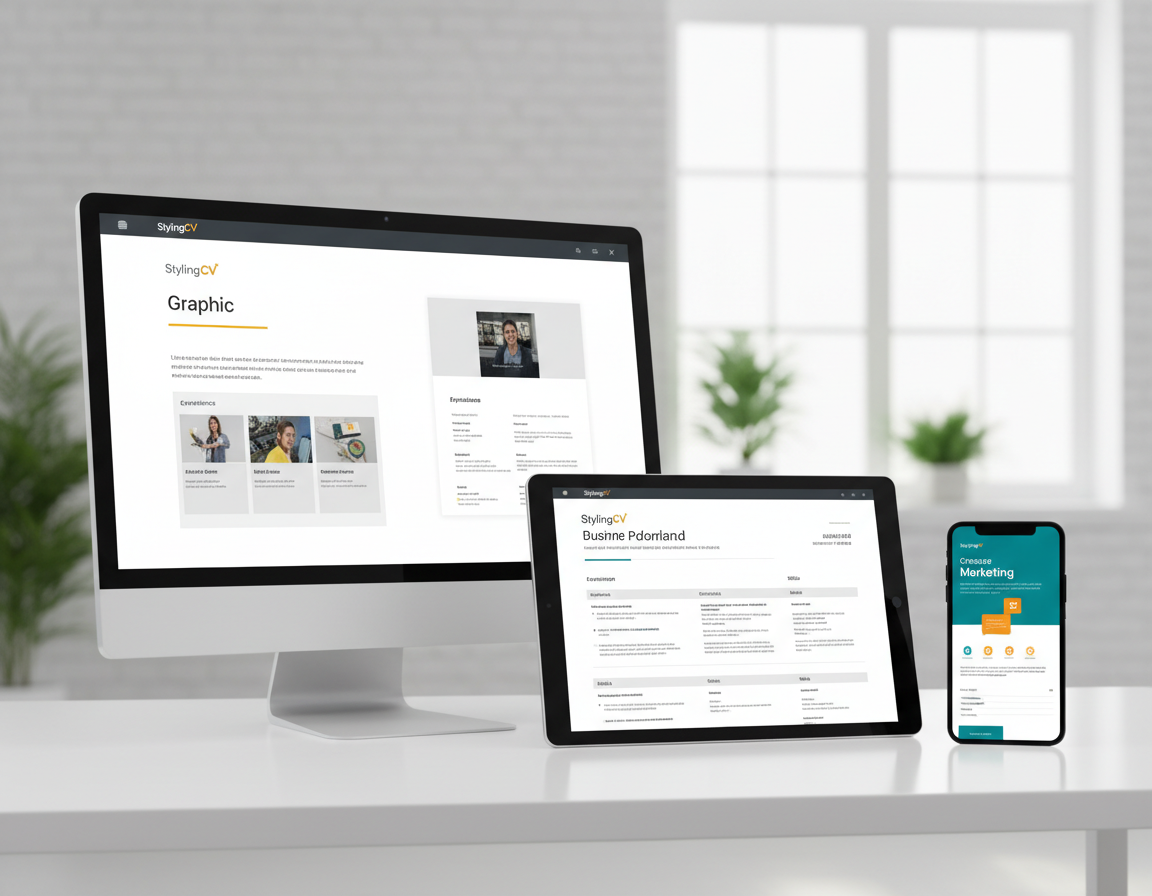
La page n’a pas besoin de couvrir tous les secteurs en détail. Mais pour le SEO et l’expérience utilisateur, il est utile de mentionner ces grands groupes métiers car ils reflètent la façon dont les utilisateurs cherchent et comparent les options.
Checklist
Checklist pratique ATS avant de postuler
Avant d’envoyer un CV, passez en revue cette checklist rapide :
- Le document utilise-t-il un format de fichier accepté par le système de l’employeur ?
- Les titres sont-ils standards et faciles à comprendre ?
- Vos mots-clés les plus pertinents sont-ils inclus naturellement ?
- Vos principales puces décrivent-elles des résultats, pas seulement des tâches ?
- Les coordonnées sont-elles dans le corps du texte, pas dans l’en-tête ou le pied de page ?
- Les dates sont-elles cohérentes partout ?
- Le document reste-t-il lisible en texte brut ?
- Quelqu’un peut-il comprendre votre niveau et votre valeur en moins de dix secondes ?
Si la plupart des réponses sont oui, votre CV est déjà mieux placé que beaucoup d’autres. Bonne nouvelle : l’optimisation ATS n’est généralement pas une question d’astuces, mais de réduction des frictions évitables.
Les meilleurs candidats ont bien sûr besoin d’une expérience solide. Mais même un bon profil peut perdre du terrain à cause d’un formatage brouillon, d’une organisation faible ou de puces vagues. Les modèles compatibles ATS aident à éviter ces problèmes auto-infligés.
Impact réel
Pourquoi une meilleure mise en page ATS peut changer vos résultats
Beaucoup de candidats pensent qu’un refus signifie qu’ils ne sont pas qualifiés. Parfois c’est vrai, mais souvent le problème est plus simple : leur CV n’a jamais donné au système ou au recruteur une chance de comprendre leur valeur. Voilà pourquoi les modèles compatibles ATS sont si importants en pratique. Ils réduisent le nombre de refus évitables avant même l’évaluation réelle.
Pensez à la différence entre ces deux situations. Dans la première, un candidat a une bonne expérience mais utilise un CV visuellement complexe avec des zones de texte, des icônes décoratives, des titres faibles et des puces pauvres en mots-clés. Dans la seconde, le même candidat présente la même expérience dans une mise en page claire, lisible, avec un vocabulaire adapté et des résultats mesurables. Le candidat n’est pas devenu plus qualifié du jour au lendemain — mais le CV est plus facile à analyser, à noter et à faire confiance.
Cette différence impacte tout le processus de recrutement. Une analyse plus précise améliore la correspondance des mots-clés. Une meilleure correspondance augmente les vues par les recruteurs. Une meilleure clarté donne plus d’entretiens. Les petites améliorations structurelles s’additionnent.
C’est aussi pourquoi les pages de CV performantes ne doivent pas présenter l’ATS comme une astuce mystérieuse. Les gens n’ont pas besoin de hacks. Ils ont besoin de documents qui communiquent clairement. Quand le modèle, le texte et l’alignement avec le poste fonctionnent ensemble, les candidats arrêtent de lutter contre la mise en page et commencent à mieux se présenter.
Pour une plateforme comme StylingCV, c’est la vraie promesse : non seulement fournir un fichier plus propre, mais aider à créer des CV plus compréhensibles, plus faciles à optimiser et plus fiables dans un vrai processus de recrutement.
FAQ
Questions fréquentes sur les modèles de CV compatibles ATS
Quel est le meilleur format de CV pour l’ATS ?
Pour la plupart, les formats chronologique ou hybride sont les plus efficaces. Ils présentent l’expérience clairement et sont faciles à lire pour les logiciels comme pour les recruteurs.
Un CV peut-il rester moderne et compatible ATS ?
Oui. Les bons modèles compatibles ATS ne sont pas moches ou dépassés. Ils évitent simplement les choix de design risqués qui perturbent l’ordre de lecture ou l’extraction du texte.
Les modèles de CV simples sont-ils meilleurs que les créatifs ?
Souvent oui — surtout pour les candidatures en ligne à fort volume. Les mises en page simples sont plus fiables à l’analyse et présentent moins de risques.
Dois-je envoyer mon CV en PDF ou Word ?
Sauf si l’employeur demande un PDF, Word (.docx) est souvent le choix le plus sûr pour l’analyse ATS.
Combien de mots-clés dois-je inclure ?
Autant que nécessaire pour refléter le poste naturellement. Privilégiez la pertinence et la précision, pas la densité.
Les tableaux et zones de texte cassent-ils toujours l’ATS ?
Pas toujours, mais ils augmentent le risque. Pour une compatibilité maximale, évitez-les pour les contenus importants.
Que doivent mettre en avant les débutants ?
Formation, stages, projets, certifications, outils techniques et compétences transférables — le tout présenté clairement et aligné avec l’offre.
StylingCV aide-t-il au-delà du modèle ?
Oui. L’avantage est de combiner des modèles compatibles ATS avec une aide rédactionnelle IA pour améliorer à la fois la structure et le contenu.