What are some common resume mistakes to avoid?
Expert guide on what are some common resume mistakes to avoid. Practical tips, templates, and examples to boost your job search and career in 2026.

Crafting a strong resume can feel like walking a tightrope—one tiny misstep, and your job prospects might plummet. The truth is, even highly qualified candidates often make common resume mistakes that sabotage their chances before they land an interview. Understanding these pitfalls is the first step to creating a resume that stands out—for the right reasons.
Recruiters spend an average of six seconds scanning a resume. Mistakes like typos, vague bullet points, or cluttered layouts can instantly derail your application. Whether you’re a recent graduate or a seasoned professional, avoiding resume errors ensures your skills and experience get the attention they deserve.
Key Resume Mistakes That Cost Opportunities
1. Typos and Grammatical Errors
Nothing screams “unprofessional” faster than spelling mistakes. Use tools like Grammarly and ask a friend to proofread. Even small errors can make recruiters question your attention to detail.
2. One-Size-Fits-All Approach
🎯 Ace Your Next Interview
Get interview-ready with a resume that showcases your achievements perfectly!
Generic resumes get ignored. Tailor your resume for each job by mirroring keywords from the job description. For example, if the role emphasizes “project management,” highlight specific projects you’ve led.
3. Overloading with Irrelevant Information
Listing every job since high school? Don’t. Focus on roles and achievements relevant to the position. Trim outdated skills or certifications that don’t align with the job.
✨ Stop Making Resume Mistakes
Create a professional, ATS-friendly resume in minutes with our AI-powered builder. No design skills needed.
4. Poor Formatting Choices
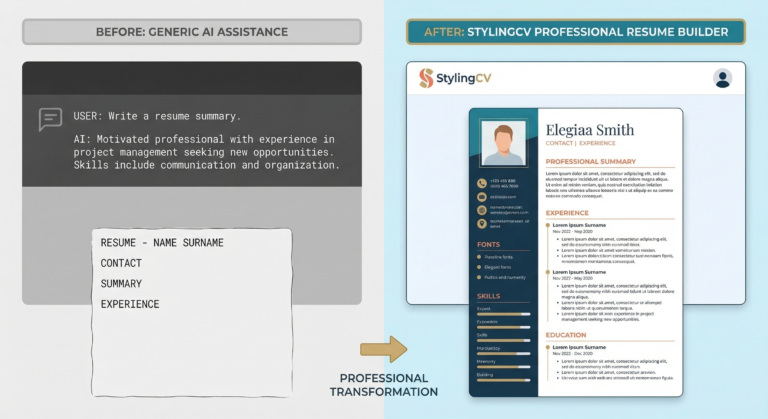
Fancy fonts and chaotic layouts confuse applicant tracking systems (ATS). Stick to clean, logical sections with bold headers and bullet points. Avoid graphics that might not render correctly.
Resume Templates That Fix These Mistakes🎯 Beat the ATS System
Our templates are specifically designed to pass Applicant Tracking Systems while looking professional.
🎯 Beat the ATS System
Our templates are specifically designed to pass Applicant Tracking Systems while looking professional.
Using a professionally designed template eliminates guesswork. Here are three templates from StylingCV that tackle common issues:
Modern Professional Template
Clean, ATS-friendly, and ideal for corporate roles. Its structured layout ensures recruiters quickly spot your key skills and experience.
Minimalist Resume Template
Perfect for avoiding clutter. Emphasizes white space and concise bullet points, making it easy to read on screens and in print.
Creative Industry Template
Balances creativity with professionalism. Great for designers or marketers, with subtle color accents and sections for portfolios or project highlights.
How to Customize Your Resume Effectively💼 Interview Success: Start with a professionally optimized resume that gets you to the interview!
💼 Interview Success: Start with a professionally optimized resume that gets you to the interview!
- Prioritize relevance: Swap out generic verbs like “responsible for” with action-oriented terms like “spearheaded” or “optimized.”
- Quantify achievements: Instead of “improved sales,” write “boosted sales by 30% in Q1 2026.”
- Match the job description: If the role wants “team leadership,” include a example of mentoring interns or leading cross-departmental meetings.
FAQs About Common Resume Mistakes
How long should my resume be?
Keep it to one page if you have under 10 years of experience. For senior roles, two pages are acceptable but avoid fluff.
⚡ Ready to Build Your Professional Resume?
Join over 6 million users who created winning resumes with StylingCV
Should I include references?
🤖 ATS Optimization Made Easy
Automatically optimize your resume for ATS with our AI-powered keyword analysis.
No. Use that space for skills or achievements. Offer references only when asked.
Is an objective statement necessary?
Objective statements are outdated. Replace them with a professional summary that highlights your value in 2-3 lines.
Can I hide employment gaps?
Don’t lie, but frame gaps strategically. For example, “Career break to upskill in digital marketing” shows proactive growth.
What’s the best font size?
Stick to 10–12 pt for body text. Smaller fonts strain the eyes; larger ones look unprofessional.
Why a Great Resume Template Matters
Avoiding common resume mistakes isn’t just about fixing errors—it’s about presenting your best self. A well-designed template guides you in organizing information clearly, impressing both ATS systems and hiring managers. Ready to upgrade your resume? Explore professional templates here and take the first step toward landing your dream job.
🚀 Prepare for Success
Create a resume that makes recruiters want to interview you!
Don’t Let Your Resume Hold You Back
Join 6+ million professionals who have created winning resumes with StylingCV
📝 Create Your Resume in 5 Minutes
Don’t let a poorly formatted resume hold you back. Use our intelligent resume builder to create a professional resume that gets past ATS systems and impresses recruiters.
✅ Ensure ATS Compatibility
Don’t let automated systems filter you out – use an ATS-optimized template. Build ATS Resume
💡 Pro Tip: StylingCV is not just a resume builder — it’s a smart AI builder that thinks. StylingCV smart AI builder in less than 2 minutes.
Related Articles
- كيفية كتابة سيرة ذاتية احترافية في 2026 — دليل شامل
- Remote Work 2026: Complete Guide to Work From Home Jobs | StylingCV
- Video Resume 2026: Complete Guide to Stand Out from Competition | StylingCV
Explore more articles in our Content Hub
Ready to build a professional resume? Build Your AI Resume Now
🦁 Check Your Resume with Stylion
Our AI-powered ATS resume checker analyzes your resume like a real recruiter. Get your score instantly.