

What is an ATS-friendly resume template?
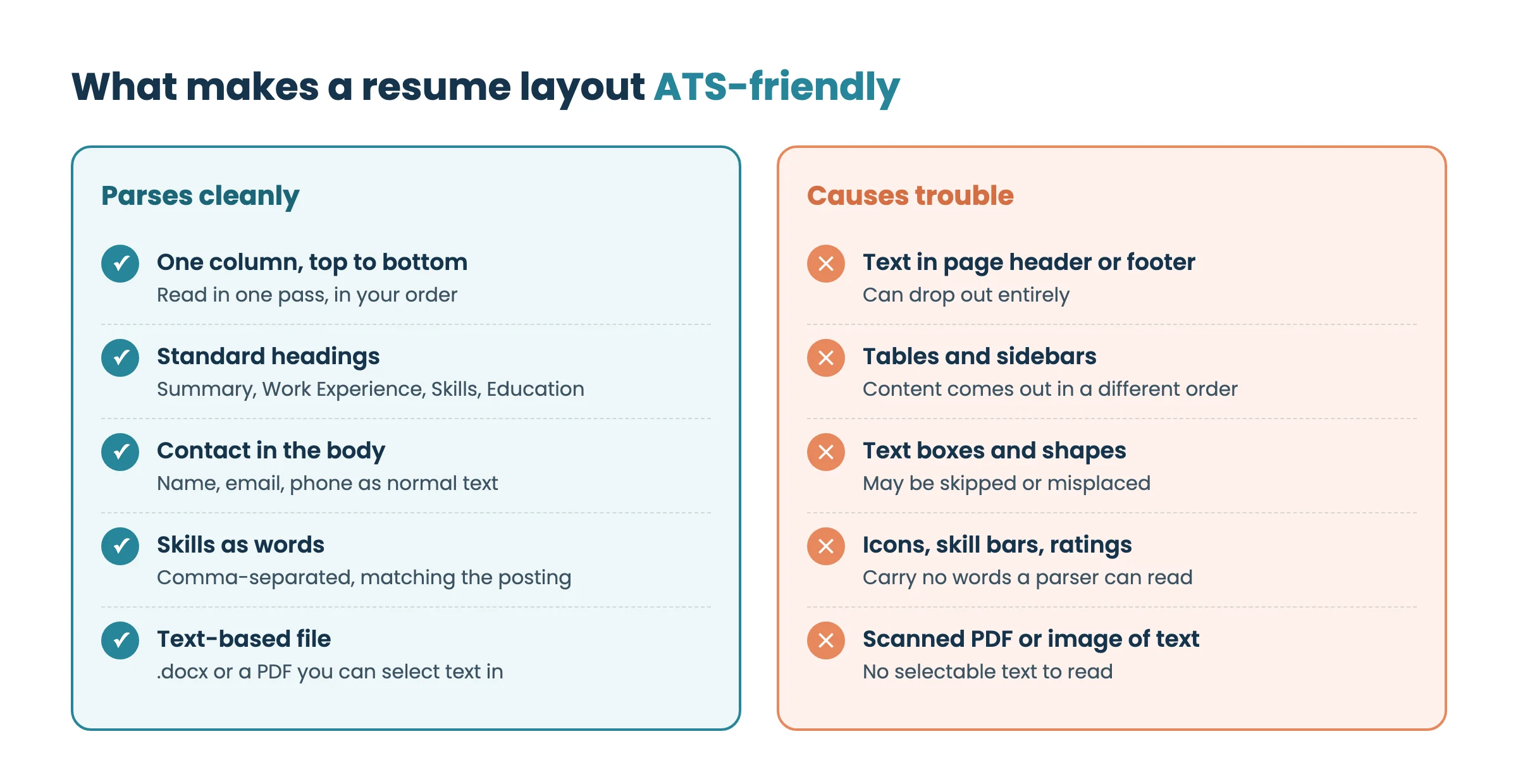
An ATS-friendly resume template keeps your content in plain, readable text: one column, standard headings such as Work Experience and Skills, contact details in the document body, and no tables, text boxes or skill bars. Applicant tracking software can then pull out your details in the order you wrote them.
Get the single-column Word template, copy its text, see what our plain-text test found, then run the same test on your file.
Download the ATS-friendly resume template
This English Word file has one column and five standard sections. We checked the file itself: it contains no tables, text boxes, images, or text in the page header or footer. The sample details use a Gulf format, so swap the city, phone and currency for your own.
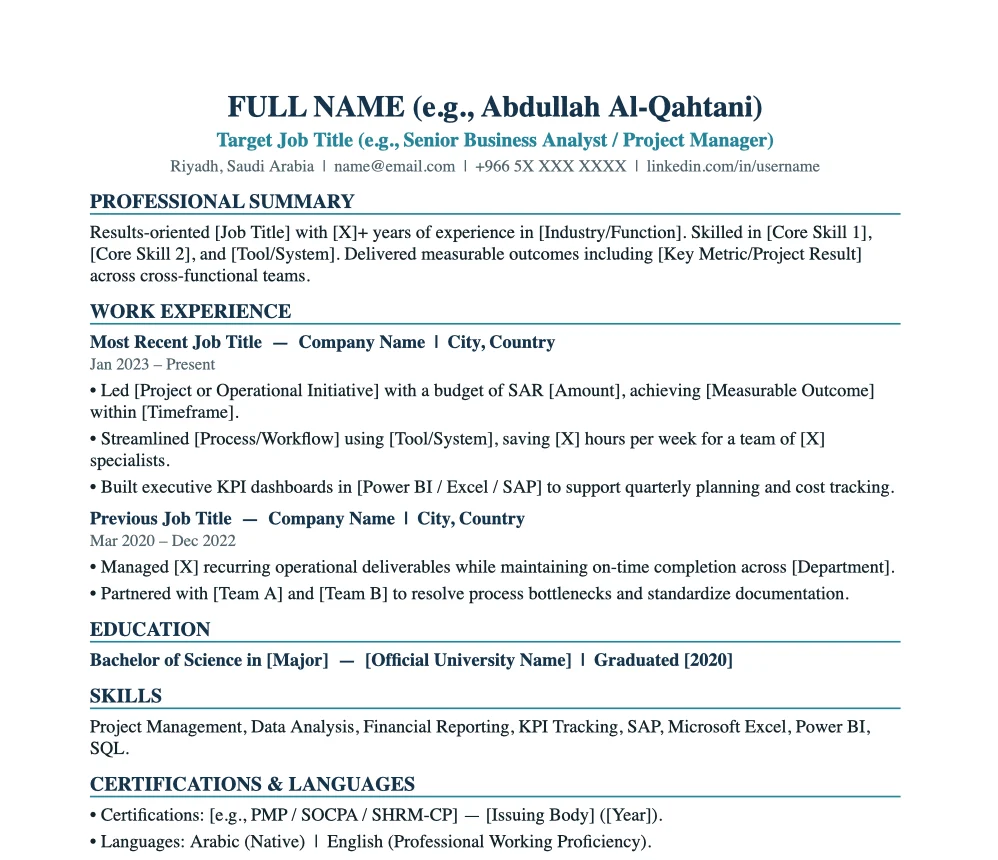
English ATS resume template (.docx)
Opens in Word and Google Docs. Replace the brackets, delete the editing note at the bottom, and save.
Download template ↓Copy the ATS resume template as text
Prefer to start in your own document? This is the full text of the Word file, in the same order.
FULL NAME (e.g., Abdullah Al-Qahtani)
Target Job Title (e.g., Senior Business Analyst / Project Manager)
Riyadh, Saudi Arabia | name@email.com | +966 5X XXX XXXX | linkedin.com/in/username
PROFESSIONAL SUMMARY
Results-oriented [Job Title] with [X]+ years of experience in [Industry/Function]. Skilled in [Core Skill 1], [Core Skill 2], and [Tool/System]. Delivered measurable outcomes including [Key Metric/Project Result] across cross-functional teams.
WORK EXPERIENCE
Most Recent Job Title — Company Name | City, Country
Jan 2023 – Present
• Led [Project or Operational Initiative] with a budget of SAR [Amount], achieving [Measurable Outcome] within [Timeframe].
• Streamlined [Process/Workflow] using [Tool/System], saving [X] hours per week for a team of [X] specialists.
• Built executive KPI dashboards in [Power BI / Excel / SAP] to support quarterly planning and cost tracking.
Previous Job Title — Company Name | City, Country
Mar 2020 – Dec 2022
• Managed [X] recurring operational deliverables while maintaining on-time completion across [Department].
• Partnered with [Team A] and [Team B] to resolve process bottlenecks and standardize documentation.
EDUCATION
Bachelor of Science in [Major] — [Official University Name] | Graduated [2020]
SKILLS
Project Management, Data Analysis, Financial Reporting, KPI Tracking, SAP, Microsoft Excel, Power BI, SQL.
CERTIFICATIONS & LANGUAGES
• Certifications: [e.g., PMP / SOCPA / SHRM-CP] — [Issuing Body] ([Year]).
• Languages: Arabic (Native) | English (Professional Working Proficiency).
What our plain-text test found
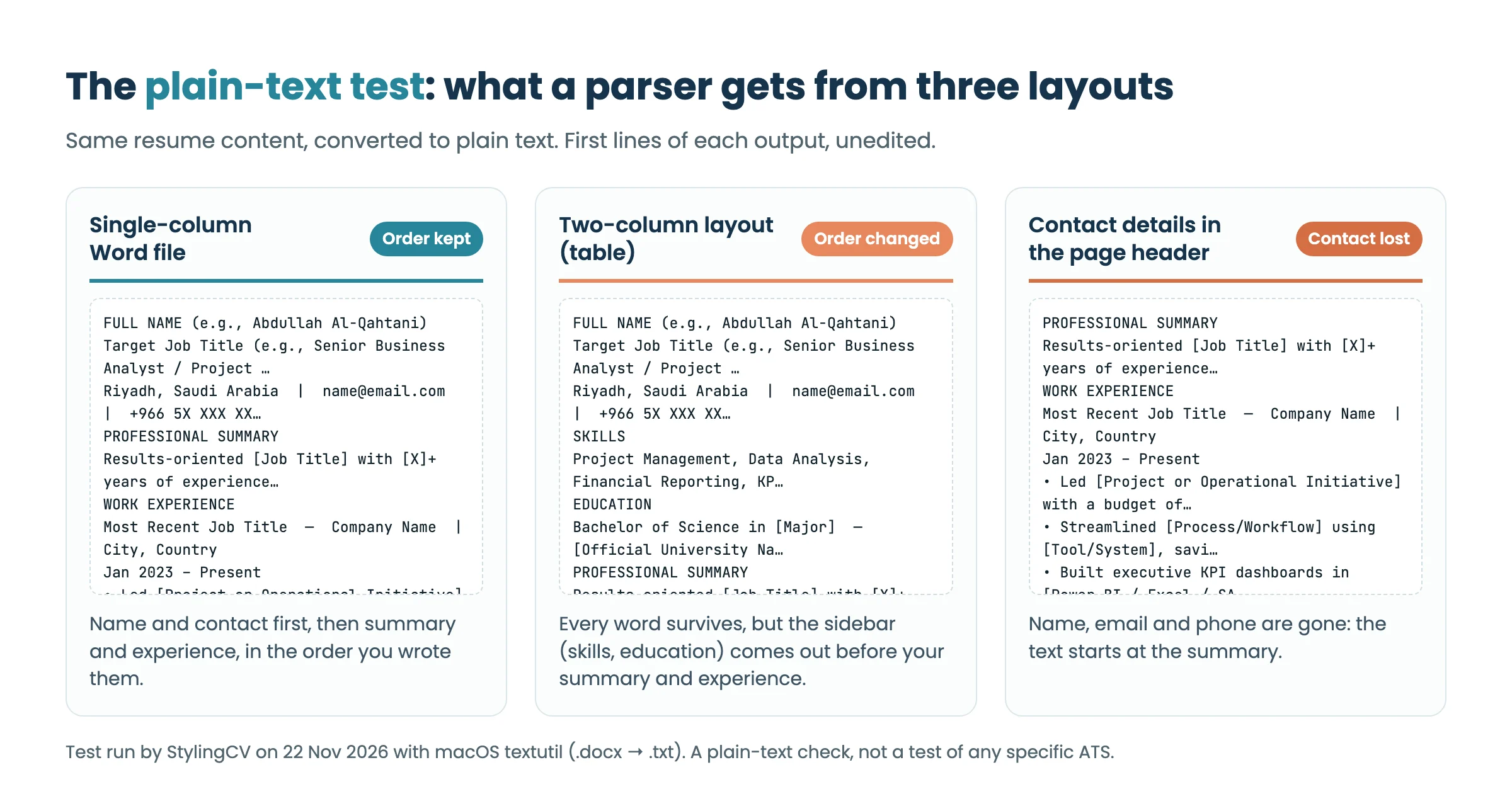
Resume parsers work from the text inside your file, so we converted three versions of the same resume to plain text and compared the results. The single-column file came through intact. The two-column version kept all 196 words but put skills and education ahead of the summary and work experience. With contact details in the Word page header, the name, email and phone were missing from the output.
Using a designed template now? See how its layout and keywords score against a real job posting.
Open the ATS checkerWhich layout choices help a parser
Most parsing trouble comes from where the text sits on the page. Keep anything a recruiter must find, above all your name and contact details, in the main body of the document.
Run the same test on your resume
You need about two minutes and no special software:
In Word, choose Save As and pick Plain Text (.txt). In Google Docs, use File, Download, Plain Text.
Your name, email and phone should be there. If they’re missing, move them out of the page header.
Summary, experience, education and skills should follow the order on your page. Jumbled sections usually point to columns or a table.
Anything inside a text box, shape, icon or image may be gone. Retype it as normal text.
Layout fixed? The next job is matching your wording to the posting. The AI wizard drafts a version for the role you paste in.
Tailor my resumeWord or PDF for an ATS resume?
Use whatever the application form asks for. When it accepts both, choose by what you need:
ATS resume template FAQ
What is an ATS-friendly resume template?
It is a resume layout that keeps your content in plain, readable text: one column, standard section headings, contact details in the document body, and no tables, text boxes or skill bars. Software can then extract your details in the order you wrote them.
Is there an ATS-friendly resume template in Word?
Yes. The StylingCV English template on this page is a single-column .docx file with no tables, text boxes, images or header text. Replace the bracketed parts, delete the editing note and save.
Should I send an ATS resume as Word or PDF?
Follow the application form. If it accepts both, a text-based PDF keeps your layout fixed and a .docx is easy for systems to read. Check that you can select the text in your PDF; a scanned PDF contains an image of the words.
Can ATS read two-column resumes?
It depends on the system and on how the columns were built. In our plain-text test, a two-column table kept every word but moved skills and education ahead of the summary and work experience. One column avoids that risk.
How can I test if my resume is ATS-friendly?
Save a copy as plain text (.txt) and read it from the top. Your name, email and phone should appear first, sections should follow your order, and nothing should be missing. Then run the resume through an ATS checker against the job posting.
Can I put my contact details in the Word header?
Keep them in the main body. When we moved the name, email and phone into the page header and converted the file to plain text, all three disappeared from the output.
Your layout is clean. Now match the job.
A parser can read your resume, and the next question is whether it finds what the posting asks for. Compare your file against the job and see which terms are missing.
Sources
- Indeed Career Guide: How to write an ATS resume
- textutil command reference (the tool used in our plain-text test)
- Microsoft Support: Headers and footers in Word


