/* ========== COMPREHENSIVE PAGE FIXES ========== */
/* Fix: Force display:grid on elements with grid-template-columns */
[style*=”grid-template-columns”] {
display: grid !important;
}
/* Fix: Force display:flex on elements with flex-wrap or justify-content */
[style*=”flex-wrap”],
[style*=”justify-content”]:not(table *):not([style*=”grid-template-columns”]) {
display: flex !important;
}
/* ========== CONTRAST FIXES ========== */
/* Hero Section – improve all text visibility */
.hero-section p {
color: rgba(255,255,255,0.9) !important;
}
.hero-section [style*=”grid-template-columns”] p {
color: white !important;
}
.hero-section [style*=”grid-template-columns”] p:last-child {
color: rgba(255,255,255,0.95) !important;
}
/* Hero Stats Row */
.hero-section [style*=”grid-template-columns”] {
display: grid !important;
grid-template-columns: repeat(4, 1fr) !important;
gap: 24px !important;
}
/* ATS Stats Box */
.ats-stats-box {
color: white !important;
}
.ats-stats-box h3 {
color: white !important;
}
.ats-stats-box p {
color: white !important;
}
.ats-stats-box > div[style*=”grid-template-columns”] {
display: grid !important;
grid-template-columns: repeat(4, 1fr) !important;
}
.ats-stats-box [style*=”background: rgba(255,255,255″] p {
color: #1a1a2e !important;
}
/* ATS Checker Tool Section */
.ats-checker-tool h2 {
color: white !important;
}
.ats-checker-tool > div > p {
color: rgba(255,255,255,0.9) !important;
}
/* Upload boxes – fix text visibility */
.ats-checker-tool [style*=”border: 2px dashed”] p {
color: #4a5568 !important;
}
.ats-checker-tool [style*=”border: 2px dashed”] p:first-of-type {
color: #2d3748 !important;
font-weight: 600 !important;
}
/* Analysis breakdown boxes – fix label visibility */
.ats-checker-tool [style*=”background: #f0fff4″] p,
.ats-checker-tool [style*=”background: #fff5f5″] p,
.ats-checker-tool [style*=”background: #ebf8ff”] p,
.ats-checker-tool [style*=”background: #faf5ff”] p {
opacity: 1 !important;
}
.ats-checker-tool [style*=”background: #f0fff4″] p:first-child {
color: #276749 !important;
font-weight: 700 !important;
}
.ats-checker-tool [style*=”background: #fff5f5″] p:first-child {
color: #c53030 !important;
font-weight: 700 !important;
}
.ats-checker-tool [style*=”background: #ebf8ff”] p:first-child {
color: #2b6cb0 !important;
font-weight: 700 !important;
}
.ats-checker-tool [style*=”background: #faf5ff”] p:first-child {
color: #6b46c1 !important;
font-weight: 700 !important;
}
/* Quick wins box */
.ats-checker-tool [style*=”background: #fffbeb”] p {
color: #92400e !important;
}
/* Tool features grid */
.ats-checker-tool [style*=”text-align: center”][style*=”padding: 16px”] p {
color: white !important;
}
.ats-checker-tool [style*=”text-align: center”][style*=”padding: 16px”] p:last-child {
color: rgba(255,255,255,0.95) !important;
}
/* ========== INTELLI SECTION CONTRAST FIXES ========== */
/* Intelli subtitle – CRITICAL fix */
.intelli-hero .intelli-subtitle,
.intelli-section-wrap .intelli-subtitle,
[class*=”intelli”] .intelli-subtitle,
.intelli-subtitle {
color: rgba(255,255,255,0.9) !important;
}
/* Intelli stat labels */
.intelli-stat-label,
.intelli-stat-card p:last-child,
[class*=”intelli-stat”] p:last-child {
color: rgba(255,255,255,0.85) !important;
}
/* Intelli agent card descriptions – CRITICAL fix */
.intelli-agent-desc,
.intelli-agent-card p,
[class*=”intelli-agent”] p {
color: rgba(255,255,255,0.85) !important;
}
/* Featured agent card – even brighter */
.intelli-agent-card.featured .intelli-agent-desc,
[class*=”intelli-agent”].featured p {
color: rgba(255,255,255,0.95) !important;
}
/* Intelli comparison section – light background */
.intelli-comparison-section,
.intelli-comparison-section * {
/* This section has light bg, keep dark text */
}
.intelli-comparison-subtitle {
color: #475569 !important;
}
/* ========== GENERAL DARK SECTION TEXT ========== */
/* Any section with dark gradient background */
[style*=”background: linear-gradient”][style*=”#1a1a2e”] p,
[style*=”background: linear-gradient”][style*=”#16213e”] p,
[style*=”background: linear-gradient”][style*=”#0f3460″] p {
color: rgba(255,255,255,0.9) !important;
}
/* Any dark section h2, h3, h4 */
[style*=”background: linear-gradient”][style*=”#1a1a2e”] h2,
[style*=”background: linear-gradient”][style*=”#1a1a2e”] h3,
[style*=”background: linear-gradient”][style*=”#1a1a2e”] h4 {
color: white !important;
}
/* AI optimization visual section */
.ai-optimization-visual h3,
.ai-optimization-visual h4 {
color: white !important;
}
.ai-optimization-visual p {
color: rgba(255,255,255,0.85) !important;
}
/* Feature cards in dark sections */
[style*=”background: rgba(255,255,255,0.08)”] h4,
[style*=”background: rgba(255,255,255,0.1)”] h4 {
color: white !important;
}
[style*=”background: rgba(255,255,255,0.08)”] p,
[style*=”background: rgba(255,255,255,0.1)”] p {
color: rgba(255,255,255,0.85) !important;
}
/* CTA sections */
.cta-box h3 {
color: white !important;
}
.cta-box p {
color: rgba(255,255,255,0.9) !important;
}
/* Templates section */
.templates-section h2 {
color: white !important;
}
.templates-section p {
color: rgba(255,255,255,0.85) !important;
}
/* Tool comparison section – styled cards */
[style*=”color: white”][style*=”background:”] p {
color: inherit !important;
}
/* Mobile responsive */
@media (max-width: 768px) {
.hero-section [style*=”grid-template-columns”],
.ats-stats-box > div[style*=”grid-template-columns”] {
grid-template-columns: repeat(2, 1fr) !important;
}
[style*=”grid-template-columns: 1fr 1fr”]:not(.ats-stats-box *) {
grid-template-columns: 1fr !important;
}
[style*=”grid-template-columns: 200px 1fr”] {
grid-template-columns: 1fr !important;
}
}
@media (max-width: 480px) {
.hero-section [style*=”grid-template-columns”],
.ats-stats-box > div[style*=”grid-template-columns”] {
grid-template-columns: 1fr !important;
}
}
Complete Guide 2026
How AI Can Optimize Your Resume
for ATS in 2026
Stop getting rejected by robots. Learn how AI-powered tools help you beat Applicant Tracking Systems, optimize keywords automatically, and land more interviews in 2026.
75%
Resumes Rejected by ATS
3x
More Interviews with AI
6 sec
Avg. Recruiter Scan Time
What is an ATS and Why Does It Matter in 2026?
An Applicant Tracking System (ATS) is software that employers use to collect, sort, scan, and rank job applications. Think of it as a digital gatekeeper that stands between your resume and a human recruiter. In 2026, these systems have become more sophisticated than ever, using artificial intelligence to evaluate candidates.
The numbers are stark: 98% of Fortune 500 companies use ATS software, and studies show that 75% of resumes are rejected before a human ever sees them. This isn’t because candidates are unqualified—it’s because their resumes aren’t optimized for how these systems work.
ATS Statistics Every Job Seeker Must Know (2026)
98%
Fortune 500 companies use ATS
75%
Resumes rejected before human review
250+
Average applications per job posting
6 sec
Time recruiters spend on initial scan
How ATS Software Scans and Ranks Resumes
Understanding the ATS scanning process is the first step to beating it. Here’s exactly what happens when you submit your resume:
The ATS Screening Process
1. Parse
Extract text & data fields
→
2. Categorize
Sort into skills, experience
→
3. Match
Compare to job requirements
→
4. Rank
Score & prioritize candidates
Popular ATS Systems Employers Use
Different companies use different ATS platforms, each with unique parsing algorithms. Here are the most common systems you’ll encounter:
| ATS System |
Market Share |
Typical Users |
Key Considerations |
| Workday |
~28% |
Fortune 500, Enterprise |
Strict formatting requirements |
| Taleo (Oracle) |
~22% |
Large corporations |
Heavy keyword matching |
| Greenhouse |
~18% |
Tech companies, startups |
More flexible parsing |
| Lever |
~12% |
Mid-size tech companies |
Modern, user-friendly |
| iCIMS |
~10% |
Healthcare, retail |
Strong skills matching |
How AI Optimizes Your Resume for ATS
Artificial intelligence has revolutionized resume optimization. Instead of manually comparing your resume to job descriptions, AI tools can analyze both documents in seconds and provide precise recommendations. Here’s how modern AI resume optimization works:
AI Resume Optimization: How It Works
📄
1. Document Analysis
AI scans your resume using Natural Language Processing (NLP) to extract skills, experience, and qualifications into structured data.
🎯
2. Job Description Parsing
The AI extracts required skills, preferred qualifications, and key phrases from the job posting, ranking them by importance.
🔄
3. Gap Identification
AI compares both documents to find missing keywords, weak sections, and opportunities to strengthen your match rate.
✨
4. Smart Suggestions
Get actionable recommendations: which keywords to add, where to place them, and how to rephrase achievements for maximum impact.
Traditional vs. AI-Enhanced Resume Writing
| Aspect |
Traditional Approach |
AI-Enhanced Method |
| Keyword Research |
Manual guessing based on job title |
Data-driven extraction from job descriptions with frequency analysis |
| Time Required |
2-4 hours per application |
15-30 minutes with AI assistance |
| Match Accuracy |
~40-50% keyword match rate |
80-95% match rate with optimization |
| Format Checking |
Trial and error; no feedback |
Instant compatibility score with specific fixes |
| Interview Rate |
5-10% of applications |
25-40% improvement in interview callbacks |
/* ========== INTELLI STYLINGCV SECTION ========== */
.intelli-section-wrap {
font-family: ‘Inter’, -apple-system, BlinkMacSystemFont, ‘Segoe UI’, Roboto, sans-serif;
line-height: 1.6;
}
.intelli-hero {
background: linear-gradient(135deg, #0F172A 0%, #1E293B 50%, #0D4F4F 100%);
padding: 80px 24px;
border-radius: 24px;
margin: 48px 0;
color: white;
position: relative;
overflow: hidden;
}
.intelli-hero::before {
content: ”;
position: absolute;
top: 0;
left: 0;
right: 0;
bottom: 0;
background: radial-gradient(circle at 20% 20%, rgba(56, 239, 125, 0.15) 0%, transparent 40%),
radial-gradient(circle at 80% 80%, rgba(102, 126, 234, 0.15) 0%, transparent 40%);
pointer-events: none;
}
.intelli-container {
max-width: 1100px;
margin: 0 auto;
position: relative;
z-index: 1;
}
.intelli-header {
text-align: center;
margin-bottom: 48px;
}
.intelli-badge {
display: inline-flex;
align-items: center;
gap: 8px;
background: rgba(56, 239, 125, 0.15);
color: #38EF7D;
padding: 8px 18px;
border-radius: 100px;
font-size: 14px;
font-weight: 600;
margin-bottom: 20px;
border: 1px solid rgba(56, 239, 125, 0.3);
}
.intelli-title {
font-size: clamp(32px, 5vw, 44px);
font-weight: 800;
color: white;
margin: 0 0 20px;
line-height: 1.15;
}
.intelli-title span {
background: linear-gradient(135deg, #38EF7D 0%, #11998E 100%);
-webkit-background-clip: text;
-webkit-text-fill-color: transparent;
background-clip: text;
}
.intelli-subtitle {
font-size: 18px;
color: rgba(255, 255, 255, 0.95);
max-width: 700px;
margin: 0 auto;
line-height: 1.7;
}
.intelli-subtitle strong {
color: #38EF7D;
}
/* Stats Grid */
.intelli-stats-grid {
display: grid;
grid-template-columns: repeat(4, 1fr);
gap: 20px;
margin-bottom: 48px;
}
.intelli-stat-card {
background: rgba(255,255,255,0.05);
backdrop-filter: blur(10px);
border: 1px solid rgba(255,255,255,0.1);
border-radius: 16px;
padding: 24px;
text-align: center;
transition: transform 0.3s, background 0.3s;
}
.intelli-stat-card:hover {
background: rgba(255,255,255,0.08);
transform: translateY(-4px);
}
.intelli-stat-number {
font-size: 42px;
font-weight: 800;
margin: 0 0 8px;
line-height: 1;
}
.intelli-stat-number.green { color: #38EF7D; }
.intelli-stat-number.purple { color: #A78BFA; }
.intelli-stat-number.pink { color: #F472B6; }
.intelli-stat-number.orange { color: #FBBF24; }
.intelli-stat-label {
font-size: 14px;
color: rgba(255, 255, 255, 0.9);
margin: 0;
}
/* Image Section */
.intelli-image-section {
margin: 48px 0;
text-align: center;
}
.intelli-image-section img {
max-width: 100%;
height: auto;
border-radius: 16px;
box-shadow: 0 25px 80px rgba(0,0,0,0.4);
}
/* Agents Section Title */
.intelli-agents-heading {
font-size: 28px;
font-weight: 700;
color: white;
text-align: center;
margin: 60px 0 40px;
}
/* Agents Grid */
.intelli-agents-grid {
display: grid;
grid-template-columns: repeat(auto-fill, minmax(320px, 1fr));
gap: 20px;
}
.intelli-agent-card {
background: rgba(255,255,255,0.03);
border: 1px solid rgba(255,255,255,0.08);
border-radius: 16px;
padding: 24px;
transition: all 0.3s ease;
}
.intelli-agent-card:hover {
background: rgba(255,255,255,0.06);
border-color: rgba(255,255,255,0.15);
transform: translateY(-2px);
}
.intelli-agent-card.featured {
background: linear-gradient(135deg, rgba(56, 239, 125, 0.1) 0%, rgba(17, 153, 142, 0.1) 100%);
border: 2px solid rgba(56, 239, 125, 0.3);
position: relative;
}
.intelli-featured-badge {
position: absolute;
top: -12px;
right: 20px;
background: linear-gradient(135deg, #38EF7D 0%, #11998E 100%);
color: #0F172A;
font-size: 11px;
font-weight: 700;
padding: 6px 14px;
border-radius: 100px;
text-transform: uppercase;
letter-spacing: 0.5px;
}
.intelli-agent-header {
display: flex;
align-items: center;
gap: 14px;
margin-bottom: 14px;
}
.intelli-agent-icon {
font-size: 32px;
line-height: 1;
}
.intelli-agent-name {
font-size: 18px;
font-weight: 700;
color: white;
margin: 0;
}
.intelli-agent-card.featured .intelli-agent-name {
color: #38EF7D;
}
.intelli-agent-score {
background: rgba(56, 239, 125, 0.15);
color: #38EF7D;
font-size: 13px;
font-weight: 700;
padding: 4px 10px;
border-radius: 100px;
margin-left: 10px;
}
.intelli-agent-score.purple {
background: rgba(167, 139, 250, 0.15);
color: #A78BFA;
}
.intelli-agent-desc {
font-size: 14px;
color: rgba(255, 255, 255, 0.9);
margin: 0;
line-height: 1.6;
}
.intelli-agent-card.featured .intelli-agent-desc {
color: rgba(255, 255, 255, 0.98);
}
/* ========== COMPARISON SECTION (LIGHT) ========== */
.intelli-comparison-section {
padding: 60px 0;
background: #F9FAFB;
margin: 48px -24px;
padding-left: 24px;
padding-right: 24px;
}
.intelli-comparison-header {
text-align: center;
margin-bottom: 40px;
}
.intelli-comparison-title {
font-size: 32px;
font-weight: 800;
color: #1E293B;
margin: 0 0 16px;
}
.intelli-comparison-subtitle {
font-size: 18px;
color: #64748B;
max-width: 600px;
margin: 0 auto;
line-height: 1.6;
}
.intelli-table-container {
max-width: 1000px;
margin: 0 auto;
overflow-x: auto;
}
.intelli-comparison-table {
width: 100%;
border-collapse: separate;
border-spacing: 0;
background: white;
border-radius: 16px;
overflow: hidden;
box-shadow: 0 4px 20px rgba(0,0,0,0.06);
}
.intelli-comparison-table thead {
background: #1E293B;
color: white;
}
.intelli-comparison-table th {
padding: 20px 24px;
font-weight: 700;
font-size: 15px;
text-align: left;
}
.intelli-comparison-table th.center { text-align: center; }
.intelli-comparison-table th.highlight {
background: #0F766E;
}
.intelli-comparison-table td {
padding: 20px 24px;
border-bottom: 1px solid #E2E8F0;
font-size: 15px;
}
.intelli-comparison-table tbody tr:last-child td {
border-bottom: none;
}
.intelli-comparison-table tbody tr:hover {
background: #F8FAFC;
}
.intelli-feature-name {
font-weight: 600;
color: #1E293B;
}
.intelli-cell-bad {
text-align: center;
background: #FEF2F2;
}
.intelli-cell-ok {
text-align: center;
background: #FFFBEB;
}
.intelli-cell-good {
text-align: center;
background: #F0FDF4;
}
.intelli-cell-value {
display: block;
font-weight: 700;
margin-bottom: 4px;
}
.intelli-cell-bad .intelli-cell-value { color: #DC2626; }
.intelli-cell-ok .intelli-cell-value { color: #D97706; }
.intelli-cell-good .intelli-cell-value { color: #16A34A; }
.intelli-cell-note {
display: block;
font-size: 13px;
color: #64748B;
}
.intelli-cell-why {
color: #64748B;
font-size: 14px;
}
/* Takeaway */
.intelli-takeaway-box {
background: linear-gradient(135deg, #38EF7D 0%, #11998E 100%);
padding: 32px 40px;
border-radius: 16px;
margin-top: 40px;
text-align: center;
max-width: 900px;
margin-left: auto;
margin-right: auto;
}
.intelli-takeaway-box p {
color: #0F172A;
font-size: 18px;
font-weight: 600;
margin: 0;
line-height: 1.6;
}
/* Responsive */
@media (max-width: 900px) {
.intelli-stats-grid {
grid-template-columns: repeat(2, 1fr);
}
.intelli-agents-grid {
grid-template-columns: 1fr;
}
}
@media (max-width: 600px) {
.intelli-hero {
padding: 48px 20px;
}
.intelli-title {
font-size: 28px;
}
.intelli-stat-number {
font-size: 32px;
}
.intelli-comparison-table th,
.intelli-comparison-table td {
padding: 14px 16px;
font-size: 13px;
}
}
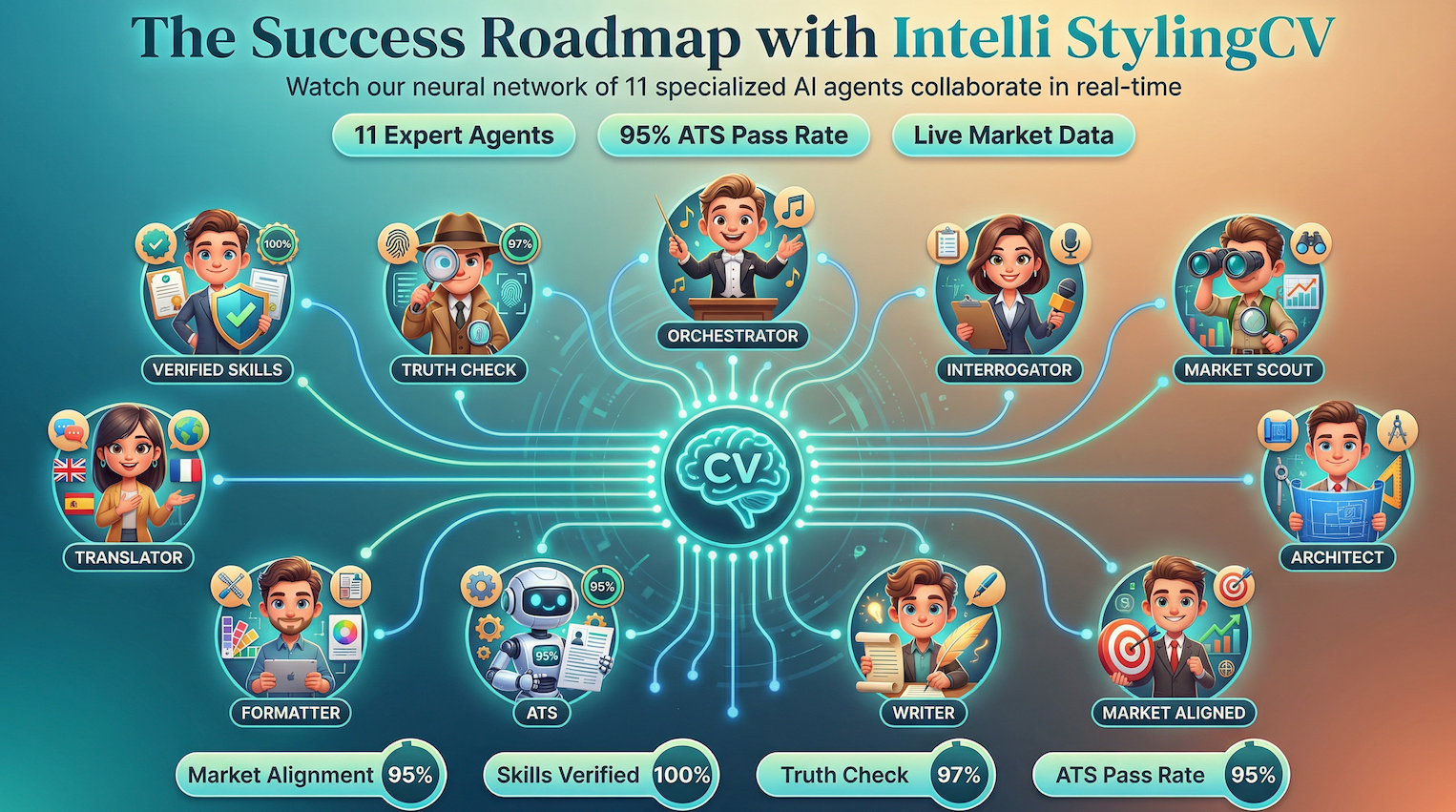
The Success Roadmap: How Our AI Agents Collaborate
Key Differentiator
Scans job markets every week for the latest trends, emerging skills, and current salary benchmarks. Unlike ChatGPT’s stale knowledge cutoff, your resume reflects what employers want right now.
Verifies your achievements against industry benchmarks. Flags exaggerations and helps you present authentic, compelling claims that pass employer scrutiny.
Cross-references your skills against job requirements and certifications. Ensures every skill listed is relevant and properly categorized for ATS systems.
The conductor of the neural network. Coordinates all 11 agents to work in harmony, ensuring your resume benefits from every specialist’s expertise.
Simulates how Workday, Taleo, Greenhouse, and other ATS systems parse your resume. Optimizes structure, keywords, and formatting for maximum compatibility.
Crafts compelling achievement statements and professional summaries. Transforms your experience into powerful, action-oriented bullet points.
Ensures your resume speaks the language employers are using today. Aligns your profile with current industry terminology and job market demands.
Creates visually appealing, ATS-compatible layouts. Balances professional design with machine readability for the best of both worlds.
Localizes your resume for international markets. Adapts language, formatting conventions, and cultural expectations for global opportunities.
Asks the right questions to uncover hidden achievements you might have overlooked. Extracts quantifiable metrics and unique differentiators.
Structures your resume for maximum impact. Determines optimal section ordering and content hierarchy based on your target role.
| Feature |
ChatGPT / Generic AI |
Intelli StylingCV |
Why It Matters |
| Market Data Freshness |
Months old
Knowledge cutoff limitation
|
Updated weekly
Market Scout scans live data
|
Job markets change fast. Yesterday’s hot skills may be oversaturated today. |
| ATS Optimization |
Generic advice
No real-time ATS testing
|
95% pass rate
Tested against actual ATS
|
75% of resumes are rejected by ATS before any human sees them. |
| Skills Verification |
None
Accepts whatever you write
|
100% verified
Cross-referenced with jobs
|
Verified skills boost credibility and reduce interview rejections. |
| Truth Checking |
Can hallucinate
May suggest inflated claims
|
97% accuracy
Flags exaggerations
|
Employers verify claims. False statements = instant disqualification. |
| Industry Specialization |
Generalist
Same approach for all fields
|
Industry-tuned
Specialized per sector
|
Healthcare, tech, finance each have unique resume conventions. |
| Workflow Integration |
Copy/paste
Manual formatting required
|
End-to-end
Write, format, export
|
Time savings of 80%+ compared to manual formatting. |
The Bottom Line: ChatGPT can help draft resume text, but StylingCV’s 11 specialized AI agents deliver a complete, ATS-optimized, market-aligned resume backed by real-time data.
Step-by-Step: Optimize Your Resume for ATS with AI
Follow this proven 7-step process to transform your resume from ATS-rejected to interview-ready. Each step builds on the previous one for maximum effectiveness.
1
Analyze the Job Description
Start by thoroughly reading the job posting. Identify required skills, preferred qualifications, and repeated phrases. Use AI tools to extract keywords automatically—they’ll catch terms you might miss.
Pro Tip: Look for keywords that appear multiple times—these are highest priority for ATS matching.
2
Audit Your Current Resume
Run your existing resume through an ATS checker to get a baseline score. Note which keywords are missing and which sections need improvement. This gives you a clear roadmap for optimization.
Pro Tip: Aim for 80%+ keyword match rate—this is the threshold where most ATS systems forward resumes to recruiters.
3
Optimize Your Professional Summary
Your summary is prime real estate. Include 3-5 critical keywords naturally within 2-3 sentences. Mirror the job title exactly if it matches your experience. This section has high ATS weight.
Example: “Results-driven Project Manager with 8+ years leading cross-functional teams in Agile environments. Proven track record of delivering enterprise software projects on time and under budget.”
4
Enhance Work Experience Bullets
Rewrite achievement statements to include keywords within context. Don’t just list skills—show how you applied them. Use action verbs and quantify results whenever possible.
Before: “Managed projects and worked with teams”
After: “Led Agile project management for 5 cross-functional teams, delivering 12 software releases with 98% on-time rate”
5
Build a Keyword-Rich Skills Section
Create a dedicated skills section with all relevant technical skills, tools, and methodologies. Use both full names and abbreviations: “Search Engine Optimization (SEO)”. Organize by category for readability.
Pro Tip: Match the exact terminology from the job description. If they say “Microsoft Excel,” don’t just write “Excel.”
6
Fix Formatting for ATS Compatibility
Use a clean, single-column layout with standard section headings. Avoid tables, text boxes, headers/footers, and graphics—these confuse ATS parsers. Stick to standard fonts and simple bullet points.
Pro Tip: Save as PDF but name your file professionally: “FirstName_LastName_Resume.pdf”
7
Test, Refine, and Submit
Run your optimized resume through the ATS checker again. Aim for 85%+ match rate. Review AI suggestions for any final tweaks. Once satisfied, submit with confidence knowing your resume will be seen.
Success Metric: After optimization, most users see 2-3x increase in interview callbacks within the first month.
Ready to Optimize Your Resume?
Our AI-powered tool walks you through each step, automatically extracting keywords and suggesting improvements.
Start Optimizing – Free →
Even the most keyword-optimized resume can fail if the formatting prevents the ATS from reading it correctly. Here’s exactly what works and what doesn’t:
✓
ATS-Friendly Practices
- Use standard fonts: Arial, Calibri, Times New Roman, Helvetica
- Stick to single-column layouts
- Use standard section headings: “Work Experience”, “Education”, “Skills”
- Save as .docx or PDF (text-based, not image)
- Use simple bullet points (•, -, or *)
- Include dates in standard format (MM/YYYY or Month YYYY)
- Keep file size under 2MB
- Name file professionally: FirstName_LastName_Resume.pdf
✗
Formatting Mistakes to Avoid
- Tables, text boxes, or columns (ATS can’t parse them)
- Headers or footers (often ignored by ATS)
- Images, logos, or graphics
- Creative fonts or special characters
- Colored backgrounds or text
- Infographics or skill bars
- Non-standard section names (“Career Journey” instead of “Experience”)
- Scanned PDFs or image-based files
File Format Comparison for ATS
📄
.DOCX
Best Compatibility
Most ATS systems parse perfectly
📋
.PDF
Good Compatibility
Text-based PDFs work well
📝
.TXT
Basic Compatibility
Loses all formatting
🖼️
Image PDF
Not Compatible
ATS cannot read images
Not all AI resume tools are created equal. Here’s an honest comparison of the top platforms available in 2026, including their strengths, limitations, and pricing:
| Tool |
Best For |
Key Features |
Pricing |
Rating |
StylingCV
Recommended |
All-in-one optimization |
ATS checker, keyword extraction, AI writing, templates |
Free / $19/mo |
★★★★★ |
| Jobscan |
Job description matching |
Match rate scoring, keyword comparison |
$49.95/mo |
★★★★☆ |
| Resume Worded |
Detailed feedback |
20+ criteria analysis, LinkedIn optimization |
$29-49/mo |
★★★★★ |
| Rezi |
ATS-focused building |
23-metric scoring, AI content generation |
$29/mo or $149 lifetime |
★★★★☆ |
| Teal |
Job search management |
Resume builder, job tracker, CRM |
Free / $29/mo |
★★★★★ |
| Kickresume |
Quick AI writing |
GPT-4 powered, free for students |
$7-19/mo |
★★★★☆ |
Why Choose StylingCV?
- Free ATS compatibility checker
- AI-powered keyword extraction from job descriptions
- Smart content suggestions that sound human
- 30+ professionally designed ATS-friendly templates
- Bilingual support (English & Arabic)
- No credit card required to start
Success Stories
Real Results from Real Job Seekers
See how AI-powered ATS optimization transformed their job search.
5x More Interviews
MR
Michael R.
Software Engineer
“I was applying to 100+ jobs with barely any responses. After optimizing my resume for ATS with the keyword suggestions, I got 5 interviews in my first week. The difference was night and day.”
★★★★★
Landed at Amazon
“The ATS checker showed my resume was only 52% matched to the Amazon PM role. After optimization, I hit 89% and got the interview. Now I’m working at my dream company!”
★★★★★
Career Changer
DK
David K.
Marketing → Data Analyst
“Switching careers seemed impossible until I learned to optimize for ATS. The tool helped me highlight transferable skills using the right keywords. Landed a data analyst role in 6 weeks.”
★★★★★
Common ATS Mistakes That Get Resumes Rejected
Even experienced professionals make these errors. Avoid these common pitfalls to ensure your resume passes ATS screening:
❌ Using “Creative” Job Titles
If your actual title was “Marketing Ninja,” change it to “Marketing Manager” – ATS doesn’t understand creative titles.
❌ Keyword Stuffing
Repeating keywords unnaturally (or hiding them in white text) triggers spam filters. Modern ATS penalizes this.
❌ Submitting the Same Resume
Using one generic resume for all applications. Each job requires customized keywords to match that specific posting.
❌ Ignoring the Job Description
Not mirroring the exact language from the posting. If they say “customer success,” don’t write “client satisfaction.”
❌ Missing Critical Sections
ATS looks for standard sections. Missing “Skills” or “Education” can lower your score significantly.
❌ Abbreviations Without Full Terms
Using only “SEO” without “Search Engine Optimization” means ATS searching for the full term won’t find you.
Frequently Asked Questions About ATS Optimization
What is the ideal ATS score I should aim for?
Aim for an 80% or higher match rate between your resume and the job description. At this threshold, most ATS systems will forward your resume to human recruiters. However, 85-95% is ideal for highly competitive positions. Remember that score alone isn’t everything—the keywords must also be naturally integrated and your experience genuinely relevant.
Can ATS detect AI-written content?
Current ATS systems don’t specifically detect AI-written content—they focus on keyword matching and formatting. However, human recruiters can often tell when content sounds generic or unnatural. The key is using AI as an optimization tool, not a replacement for authentic experience. Always review and personalize AI suggestions to ensure they accurately reflect your genuine qualifications and voice.
Should I use PDF or Word format for ATS?
Word (.docx) format offers the best ATS compatibility, as all systems can parse it perfectly. PDF works well if it’s text-based (not a scanned image). When in doubt, check the job application—some specifically request one format. If no preference is stated, .docx is the safest choice. Never submit image-based PDFs, as ATS cannot read them at all.
How often should I update my resume for different jobs?
Every single application should have a tailored resume. This doesn’t mean rewriting everything—maintain a master resume and customize key sections for each job: the summary, skills section, and relevant experience bullets. AI tools make this process fast, typically taking 15-30 minutes per application instead of hours.
Do all companies use ATS? What about small businesses?
While 98% of Fortune 500 companies use ATS, smaller businesses may not. However, mid-size companies increasingly adopt affordable ATS solutions. Even if a company reviews resumes manually, optimizing for ATS means your resume is well-organized with clear keywords—which helps any reader. It’s always worth optimizing regardless of company size.
Is it cheating to use AI to optimize my resume?
Not at all—it’s smart strategy. AI resume tools are no different from using spell-check, templates, or career counseling services. You’re not fabricating qualifications; you’re presenting real experience in the most effective way. Employers use AI to screen candidates, so it’s fair for candidates to use AI to communicate their qualifications effectively. The key is maintaining honesty about your actual skills and experience.
What’s the difference between ATS optimization and keyword stuffing?
ATS optimization means naturally integrating relevant keywords within context—showing how you used skills to achieve results. Keyword stuffing is cramming keywords unnaturally, repeating them excessively, or hiding them in white text. Modern ATS systems and recruiters easily detect stuffing and will reject your resume. Quality optimization reads naturally to humans while containing the right keywords for machines.
How long should an ATS-optimized resume be?
ATS doesn’t penalize length, but recruiters do. One page is ideal for early-career professionals (0-10 years experience). Two pages are acceptable for senior roles with extensive relevant experience. Never pad your resume just to add keywords—quality over quantity. Focus on your most relevant, recent experience that matches the job requirements.
Conclusion: Master ATS to Land More Interviews in 2026
In 2026’s competitive job market, understanding and optimizing for ATS isn’t optional—it’s essential. The good news? With AI-powered tools, what once took hours of manual work now takes minutes.
Here’s what you’ve learned:
- 75% of resumes are rejected by ATS before humans see them—but yours doesn’t have to be
- AI tools can analyze job descriptions in seconds and identify exactly which keywords you need
- Proper formatting is as important as content—use simple layouts ATS can parse
- Each application needs customization—generic resumes consistently underperform
- The goal is 80%+ match rate—achievable with the right strategy and tools
The professionals who understand how to work with ATS—not against it—consistently land more interviews. They’re not more qualified than you; they’ve simply learned to communicate their qualifications in a way that both machines and humans can recognize.
Your qualifications deserve to be seen. Don’t let a poorly optimized resume stand between you and your dream job.
Ready to Beat the ATS?
Get your free ATS score and start optimizing your resume with AI. Join millions of job seekers who’ve increased their interview rates.
No credit card required • Results in 30 seconds
Explore More Resources
Related AI Tools & Guides:
🦁 Check Your Resume with Stylion
Our AI-powered ATS resume checker analyzes your resume like a real recruiter. Get your score instantly.
Check Your Resume Free →